UbuntuStudio/Artwork/UserShowcase - Ubuntu Wiki
Source: https://wiki.ubuntu.com/UbuntuStudio/Artwork/UserShowcase
UserShowcase
Organization -- Artwork -- (edit) Team Pages - Art Team Page - Website Team Page Ubuntu Studio Artwork - User Show Case - Official 13.10 S Art -- S blueprint - Official 14.04 T Art -- T blueprint - Official 16.04 T Art
Contents
-
Ubuntu Studio 20.04 LTS Wallpaper Contest Contest Schedule Entry Submission
-
Design Guidelines & Resources File Formats Templates Ubuntu Studio Color Samples Ubuntu Studio Official Logo Ubuntu Studio Wordmarks Ubuntu Studio Circles Content Rules Composition Constraints Screen Resolution and Aspect Ratio
WELCOME
Ubuntu Studio is a free and open operating system for creative people. We provide the full range of multimedia content creation applications for each of our workflows: audio, graphics, video, photography and publishing. Additional details are at: https://ubuntustudio.org
We provide the full range of multimedia content creation applications for each of our workflows: audio, graphics, video, photography and publishing.
Additional details are at: https://ubuntustudio.org
Ubuntu Studio 20.04 LTS Wallpaper Contest
Ubuntu Studio 20.04 LTS will be officially released on April 23, 2020. The Ubuntu Studio community is hosting a wallpaper design contest! The contest is open to Digital Artists, Designers, Dilettantes and Doodlers, especially Ubuntu Studio enthusiasts. We hope to collect the coolest, most beautiful, inspiring, innovative and downright slick desktop wallpapers. Each artist may submit up to 4 pieces. A short list of images will be selected that will be put up to public vote. The top selections will become part of the wallpaper pool of the Ubuntu Studio 20.04 LTS.
If you are enjoying Ubuntu, Ubuntu Budgie, Ubuntu Kylin, Ubuntu MATE, Kubuntu, Lubuntu, Xubuntu or Ubuntu Server we welcome your contributions as well!
If you are interested, take a look at the [UbuntuStudio/Artwork/CosmicWallpaperWinners|Wallpaper Contest Winners]] from the 18.10 wallpaper contest.
Now, GET BUSY! Adapt! Build! Compose! Conceptualize! Design! Draft! Draw! Edit! Post-Process! Redesign! Render! Re-purpose! Shoot! CREATE! Show us what you can do with Ubuntu Studio's graphic design, video and photography tools!
Contest Schedule
- Submit Entries: February 1, 2020 - March 1, 2020
- Review and voting: March 2-6, 2020
- Results Announcement: March 7, 2020
Entry Submission
Please upload your submission to imgur, tag it with #ubustucontest2020
Design Guidelines & Resources
This information is meant to provide guidance and resources to users who want to submit art to Ubuntu Studio or related projects. If including a logo, failure to use any logos other than those supplied here will result in automatic disqualification as it will constitute a violation of the Ubuntu Brand Guidelines.
File Formats
- Use PNG format for bitmap files (ie any files in which fewer colors are repeated throughout, especially when the colors are in large blocks). Use JPGs for photos and final images in order to reduce the file size, as this format can cause visible compression artefacts.
- Make the XCF source files available, if you happen to work with GIMP
- Use SVG for vector art.
- Work generated with proprietary applications like Photoshop and Illustrator is acceptable, but files in their formats are useless for many of us. To avoid compatibility issues, you are STRONGLY encouraged to use F/Loss tools such as those so abundantly available in Ubuntustudio! Consider Blender, Darktable, Gimp, Inkscape, LibreOffice Draw, Krita, Mypaint, etc.
Work generated with proprietary applications like Photoshop and Illustrator is acceptable, but files in their formats are useless for many of us. To avoid compatibility issues, you are STRONGLY encouraged to use F/Loss tools such as those so abundantly available in Ubuntustudio! Consider Blender, Darktable, Gimp, Inkscape, LibreOffice Draw, Krita, Mypaint, etc.
Templates
An SVG template for use with Inkscape and an XCF template for GIMP. Both have a 2560 x 1600 pixel canvas to use the largest commonly offered resolution, currently. "Passepartout" layers allow to see how things will look when this space is cropped to conform to other common aspect ratios.

This simulates the effect the "Style: Zoom" setting in "Appearance Preferences: Background" will have: the image is scaled up or down such that it fills the screen without distorting it. If the aspect ratio of the image is wider than that of the screen, it will be scaled to the same height and the areas on the side will be cropped. If the aspect ratio of the image is taller than that of the screen, it will be scaled to the same width and the areas on top and bottom will be cropped.
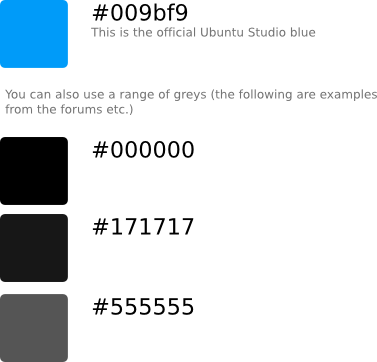
Ubuntu Studio Color Samples
Ubuntu Studio Official Logo
You may use these brand assets so long as you comply with Ubuntu Brand Guidelines.
To download images on firefox, click on the link below, then right click on the following page and select "save page".


Ubuntu Studio Wordmarks
You may use these brand assets so long as you comply with Ubuntu Brand Guidelines.
To download images on firefox, click on the link below, then right click on the following page and select "save page".


Ubuntu Studio Circles
You may use these brand assets so long as you comply with Ubuntu Brand Guidelines.
To download images on firefox, click on the link below, right click on the following page and select "save page".



Content Rules
Do not break or bend the Content Rules!
- No illustrations some may consider inappropriate, offensive, hateful, tortuous, defamatory, slanderous or libelous.
- No sexually explicit or provocative images.
- No images of weapons or violence.
- No alcohol, tobacco, or drug use imagery.
- No designs which promote bigotry, racism, hatred or harm against groups or individuals; or promotes discrimination based on race, gender, religion, nationality, disability, sexual orientation or age.
- No religious, political, or nationalist imagery.
Composition
-
Generally logo use on the wallpaper is discouraged but tastefully done exceptions will always be considered.
-
Avoid high frequency images. ( A soft focus is one way to achieve this )
-
No version numbers. Some individuals may desire to use an older theme, or use the latest theme in their older version of Ubuntustudio. Let your submission be about choice and do not use version numbers in your artwork.
-
Generally avoid text, it calls for attention too much and will likely look bad when scaled. Plus it can't be translated easily.
-
Be careful with small patterns, they might become uneven when scaled.
-
Consider how the wallpaper will interact with the panels, icons and windows.
Constraints
- The final dimension should be 3840 x 2160 pixels (4K resolution).
- Submissions must adhere to the Creative Commons ShareAlike 3.0 license, and your emailed entry is presumed to comply with this license.
- Attribution must be declared if the submission is based on another design.
Submissions must adhere to the Creative Commons ShareAlike 3.0 license, and your emailed entry is presumed to comply with this license.
Screen Resolution and Aspect Ratio
It is important to note the diversity of displays which Ubuntustudio needs to support. Although the desired image format is 3840 x 2160 pixels (4K resolution) the composition should support a variety of image formats.
Typical screen resolutions:
Desktops
| 3840 | 2160 | 1.77 | 16:9 * Desired Format |
| 2560 | 1600 | 1.6 | 8:5 |
| 2560 | 1600 | 1.6 | 8:5 |
| 1920 | 1200 | 1.6 | 8:5 |
| 1680 | 1050 | 1.6 | 8:5 |
| 1440 | 900 | 1.6 | 8:5 |
| 2560 | 1440 | 1.77 | 16:9 |
| 2048 | 1152 | 1.77 | 16:9 |
| 1920 | 1080 | 1.77 | 16:9 |
| 1600 | 1200 | 1.33 | 4:3 |
| 1024 | 768 | 1.33 | 4:3 |
| 1280 | 1024 | 1.25 | 5:4 |
Width
Height
Factor
Aspect Ratio
3840
2160
1.77
16:9 * Desired Format
2560
1600
1.6
8:5
2560
1600
1.6
8:5
1920
1200
1.6
8:5
1680
1050
1.6
8:5
1440
900
1.6
8:5
2560
1440
1.77
16:9
2048
1152
1.77
16:9
1920
1080
1.77
16:9
1600
1200
1.33
4:3
1024
768
1.33
4:3
1280
1024
1.25
5:4
Laptops
| 1920 | 1200 | 1.6 | 8:5 |
| 1680 | 1050 | 1.6 | 8:5 |
| 1440 | 900 | 1.6 | 8:5 |
| 1280 | 800 | 1.6 | 8:5 |
| 1920 | 1080 | 1.77 | 16:9 |
| 1680 | 945 | 1.77 | 16:9 |
| 1366 | 768 | 1.77 | 16:9 |
| 1024 | 576 | 1.77 | 16:9 |
Width
Height
Factor
Aspect Ratio
1920
1200
1.6
8:5
1680
1050
1.6
8:5
1440
900
1.6
8:5
1280
800
1.6
8:5
1920
1080
1.77
16:9
1680
945
1.77
16:9
1366
768
1.77
16:9
1024
576
1.77
16:9
Tablets
| 1024 | 1024 | 1.00 | 1:1 |
Width
Height
Factor
Aspect Ratio
1024
1024
1.00
1:1
UbuntuStudio/Artwork/UserShowcase (last edited 2020-02-07 00:47:10 by eeickmeyer)